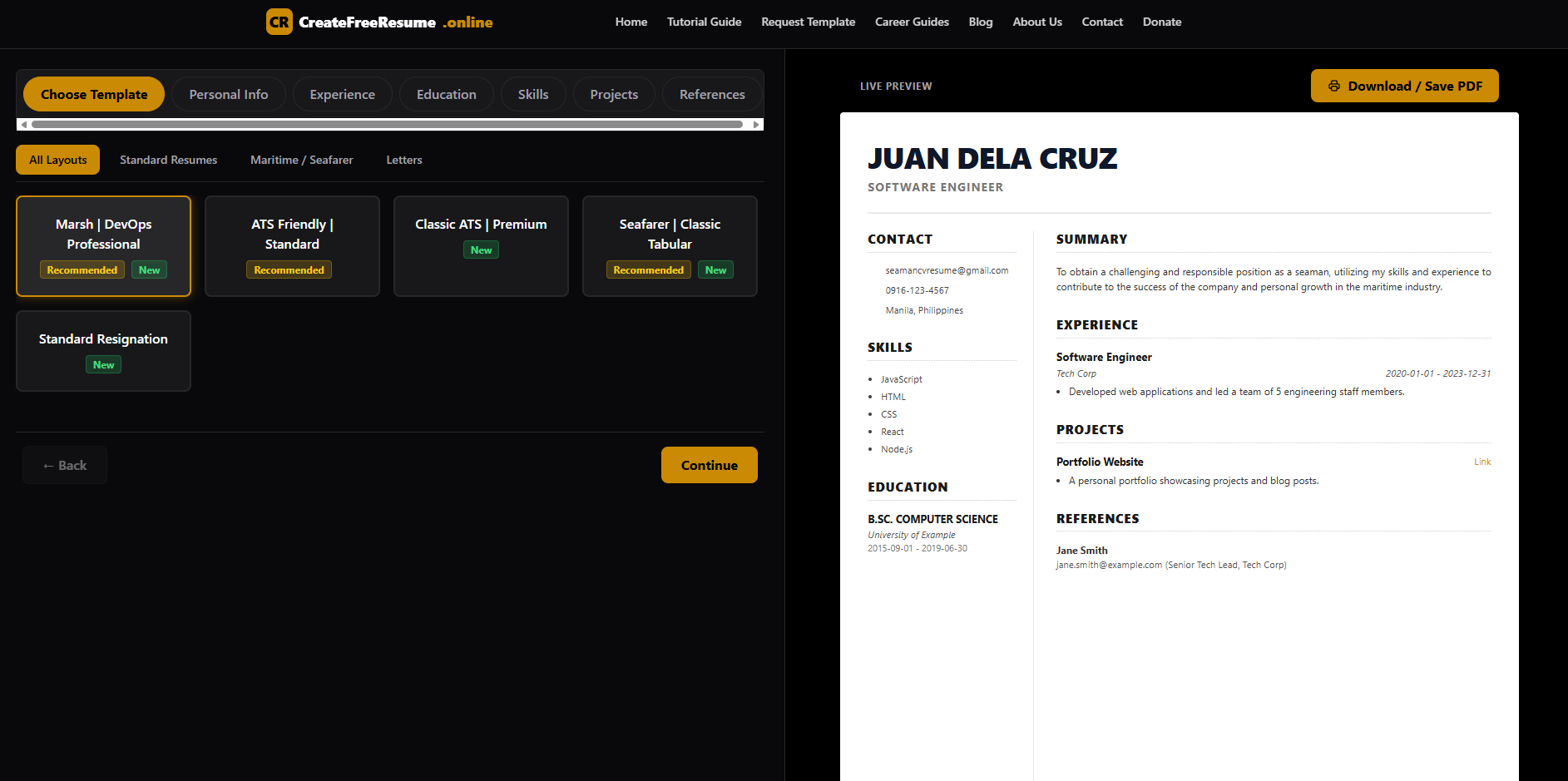
Create a professional resume online with practical guidance on what to include, how to present your experience, and how to improve your chances of getting noticed by employers.
Overview
Creating a free resume online can make the job application process easier when you know what information employers need to see. A strong resume presents your experience, education, skills, and achievements in a clear order without unnecessary information. Job seekers can use an online resume builder as a starting point, but the quality of the final resume still depends on the accuracy and relevance of the information provided. The most effective approach is to match your resume with the position you want while keeping every statement truthful and easy to understand. Whether you are applying for your first job, changing careers, or looking for a better position, a carefully prepared resume can help communicate your professional value.
Create a Free Resume Online
If you are searching for how to create a free resume online, the first step is to gather your information before worrying about design. A resume should tell a clear story about your professional background. Employers should be able to understand what you have done, what you can do, and why your experience is relevant to the position.
CreateFreeResume.online provides an online starting point for people who want to create a resume digitally rather than build every section from a blank document. An online approach can be especially useful for students, fresh graduates, freelancers, career changers, and job seekers who want to organize their information before applying for work.
The important part is not simply creating a resume. The goal is to create a resume that represents your real qualifications and gives an employer useful information quickly.
What Information Should a Professional Resume Include?
A professional resume normally contains several important sections. The exact structure can vary depending on your experience and the position you want, but the following information gives most job seekers a practical foundation.
- Full name: Use the name you normally use professionally.
- Contact information: Include a professional email address and reliable phone number.
- Location: Your city and country can be useful when applying for location-based positions.
- Professional summary: Briefly explain your experience, strengths, and career direction.
- Work experience: List relevant jobs, responsibilities, projects, and accomplishments.
- Education: Include relevant degrees, programs, schools, and training.
- Skills: Focus on abilities that are useful for the position.
- Certifications: Add professional certifications when they support your application.
- Projects: Personal, academic, freelance, or professional projects can demonstrate practical ability.
- Portfolio or professional links: Include relevant websites, portfolios, or professional profiles when appropriate.
Do not add information simply because a resume template provides a space for it. Every section should have a purpose and help an employer understand your qualifications.
How to Make a Resume Online for Your First Job
Creating a resume for your first job can be difficult because you may not have years of employment history. However, having limited work experience does not mean you have nothing valuable to present.
Students and recent graduates can focus on education, internships, school projects, volunteer activities, freelance work, technical skills, and achievements. A personal project can also demonstrate initiative when it has a clear connection to the position.
For example, someone applying for an entry-level web development position could mention a website they built, programming languages they have practiced, database projects, or freelance assignments. Someone applying for an administrative position could highlight organization, spreadsheet experience, document preparation, scheduling, and communication skills.
The key is to describe real experience instead of apologizing for having limited employment history.
How to Write a Resume Summary That Gets Attention
A resume summary should give the reader a quick understanding of your professional background. It should not be a long personal story.
A weak summary might say:
I am looking for a challenging job where I can use my skills and grow professionally.
This statement is common but does not provide much useful information.
A stronger summary explains the applicant's background and practical value:
Detail-oriented customer service professional with experience assisting customers, handling service requests, maintaining accurate records, and communicating clearly with clients.
The second example gives the employer specific information without making unsupported claims.
When writing your own summary, identify your strongest relevant experience first. If you are changing careers, focus on transferable skills and explain how your existing experience connects to your new career direction.
How to Describe Work Experience on a Resume
Your work history should do more than list job titles. It should show what you actually contributed.
Instead of writing:
Responsible for answering customer calls.
Use a more informative description:
Assisted customers by phone, resolved common account concerns, and documented service requests accurately.
The second version provides more context while remaining simple and direct.
Whenever the information is accurate, measurable results can make a responsibility more meaningful. For example, an applicant who genuinely processed more than 50 customer requests per day could mention that experience. A person who actually improved response time by approximately 20% could include that result.
Do not invent statistics to make your resume appear more impressive. Specific information is valuable only when it is truthful and can be explained during an interview.
How to Choose Resume Skills for a Specific Job
One of the most common mistakes is creating a long list of skills that has little connection to the position.
If you are applying for a customer service job, relevant skills may include customer communication, problem solving, order processing, record keeping, and email support.
If you are applying for a technical position, relevant skills could include programming, database management, troubleshooting, website development, software testing, or system administration.
The best strategy is to read the job description carefully and identify the abilities the employer actually needs. Then compare those requirements with your real experience.
This is also useful for applicants searching for resume keywords for a specific job. Relevant terminology can help an employer quickly recognize that your background matches the position. However, keywords should appear naturally in descriptions of your real experience rather than being repeated throughout the document.
How to Create a Resume Without Work Experience
People often search for how to make a resume with no work experience because they assume employers only care about previous employment. That is not always the case.
If you have no formal work history, consider the experience you already have. School assignments, internships, volunteer work, freelance projects, community activities, and personal projects may demonstrate useful abilities.
For example, a student applying for a marketing internship could describe a school campaign project, social media project, research assignment, or event they helped organize.
A new programmer could describe an application, website, or database project they completed.
A person applying for an office position could mention experience managing school records, organizing events, preparing documents, or working with spreadsheets.
Focus on what you learned and what you accomplished. Avoid filling the page with unrelated information simply because you want the resume to look longer.
How to Write a Resume for Career Change
Career changers have a different challenge. Their previous job title may not directly match their target position.
The solution is to identify transferable skills for a career change.
For example, a retail employee may have developed customer communication, inventory management, sales support, problem solving, and cash-handling experience. Those skills may remain useful when moving into customer support, administrative work, sales operations, or another related field.
Do not hide your previous career. Instead, explain the parts of your experience that are relevant to the direction you want to take.
Your professional summary can also help establish the connection between your previous experience and your new career goal.
Resume Strategy: Match the Document to the Job
A strong resume is rarely a one-size-fits-all document.
If you are applying for several different positions, create a reliable master resume containing your complete professional information. Then create a targeted version for each important application.
For example, a person with experience in both customer service and administrative work may emphasize communication and customer support for one application while highlighting scheduling, documentation, and office software skills for another.
This strategy saves time while allowing the final version to remain relevant.
Before submitting a resume, compare it with the job description and ask three questions:
- Does my resume clearly show the experience the employer requested?
- Are my most relevant skills easy to find?
- Have I removed information that does not support this particular application?
Resume Formatting and Readability
A professional resume does not need complicated graphics. Clear organization is usually more useful than excessive decoration.
Use consistent headings, spacing, dates, and bullet points. Keep descriptions concise enough that a reader can scan them without struggling through large blocks of text.
Make sure your contact information is easy to locate and that your employment history follows a logical order.
Before sending your resume, review it on the device or software you intend to use for the final submission. Formatting problems can sometimes appear after a document is exported or converted into another file format.
Understanding ATS-Friendly Resume Practices
Many job seekers search for an ATS-friendly resume because some companies use applicant tracking systems to organize applications.
An applicant tracking system may process information from submitted resumes, but the exact behavior depends on the employer's software, configuration, and hiring process. No resume format can honestly guarantee that an application will pass every system.
A practical approach is to keep your resume clear and easy to parse. Use standard section names such as Experience, Education, Skills, and Certifications. Avoid unnecessary visual elements that make important information difficult to identify.
Most importantly, write the resume for the actual hiring decision. A document filled with keywords but lacking meaningful evidence of experience is unlikely to be persuasive to a human reader.
Pros and Cons of Creating a Resume Online
Advantages
- Saves preparation time: Starting with an online tool can be easier than designing every section manually.
- Simple organization: Digital resume creation can help keep professional information in one place.
- Easy editing: Online documents can be updated as your experience changes.
- Useful for beginners: A structured starting point can help first-time job seekers understand the basic sections of a resume.
- Convenient access: An online approach can be practical when you need to prepare or update a resume without starting from a blank document.
Disadvantages
- Limited customization: Some online tools may restrict how much you can change the layout.
- Template dependence: A visually attractive template does not automatically make the content stronger.
- Privacy considerations: Users should understand how a website handles information before entering sensitive personal details.
- Quality still depends on the user: An online builder cannot replace accurate information, proofreading, and thoughtful job targeting.
- Not every design suits every position: A creative layout may not be appropriate for a highly traditional professional environment.
Efficiency Perspective: Create Once, Improve Over Time
The most efficient way to manage your resume is to treat it as a professional document that develops with your career.
Keep a master record of your employment dates, responsibilities, accomplishments, certifications, projects, and skills. When you complete an important project or learn a useful skill, update your information while the details are still fresh.
This approach is more efficient than rebuilding your resume every time you find a job opening.
You can then create a targeted version for each application by emphasizing the experience most closely related to the employer's requirements.
Efficiency does not mean removing useful information simply to make the process faster. It means creating a reliable system that makes future updates easier while keeping every application relevant.
Important Resume Trust and Accuracy Tips
Your resume should always represent your real professional background.
Do not claim certifications you have not earned. Do not change employment dates to hide gaps. Do not list software you have never used simply because it appears in a job description.
If you have a gap in employment, it is usually better to explain it honestly when appropriate than to create false information.
Accuracy also applies to contact information. Check your phone number, email address, website links, company names, job titles, and employment dates before submitting an application.
A well-written resume can attract attention, but trust is even more important when an employer begins verifying information.
How to Improve Your Resume Before Applying
After creating your first version, review the document from the perspective of the employer.
First, check whether the opening section immediately explains who you are professionally. Next, examine your experience and remove responsibilities that are irrelevant to the position.
Then look for opportunities to replace vague statements with specific examples.
For instance, instead of saying that you are "hardworking," demonstrate that quality through an actual responsibility, result, project, or achievement.
Instead of saying that you have "good communication skills," explain how you communicated with customers, teams, clients, or managers in a real situation.
Evidence is generally more useful than unsupported adjectives.
Frequently Asked Questions
How can I create a free resume online?
You can begin by choosing an online resume creation tool such as CreateFreeResume.online, then prepare your contact information, professional summary, experience, education, skills, and other relevant details. Review the finished document carefully before using it for a job application.
What should I put on a resume if I have no job experience?
Include relevant education, internships, school projects, volunteer activities, freelance assignments, personal projects, certifications, and practical skills. Explain what you accomplished instead of focusing only on the fact that you have not held a formal job.
How long should a resume be?
The appropriate length depends on your experience, industry, and the position. Avoid adding unrelated information simply to increase the number of pages. Include enough relevant information to demonstrate that you are qualified for the job.
What are the best keywords to use on a resume?
The best keywords are the relevant terms used naturally in the job description and supported by your actual experience. For example, a customer support position may mention customer service, communication, ticket handling, or account support. Only include terms that accurately describe your abilities.
How do I make an ATS-friendly resume?
Use clear section headings, readable formatting, standard terminology, and relevant information. Avoid relying heavily on decorative elements that could make important content difficult to identify. Remember that ATS behavior differs between systems, so no format can guarantee a specific result.
Should I customize my resume for every job?
Yes, when practical. A targeted resume can emphasize the experience and skills that matter most to a particular position. You do not need to rewrite everything each time. Maintaining a master resume can make targeted editing much faster.
Can I include freelance work on my resume?
Yes. Freelance work can demonstrate practical experience, client communication, project management, technical skills, and other abilities. Describe the work accurately and explain the responsibilities or results that are relevant to the position.
What should I do if my resume has an employment gap?
Do not create false employment information to cover the gap. Present your employment history accurately and, when relevant, explain useful activities during the period, such as education, training, caregiving, freelance work, or personal projects.
Should I include every skill I know?
No. Focus on skills that are relevant to the position and that you can demonstrate through your education, work, projects, or other experience. A shorter list of meaningful skills is generally more useful than a long list of unrelated abilities.
How often should I update my resume?
Update it whenever you gain meaningful experience, complete a project, earn a certification, change jobs, or develop an important skill. Keeping your information current makes future job applications easier and reduces the chance of forgetting useful accomplishments.
Start Building Your Resume Online
A strong resume starts with accurate information and a clear understanding of the job you want. An online resume tool can make the preparation process more convenient, but the content remains the most important part of the document.
If you are looking for a practical way to create a resume online for free, visit CreateFreeResume.online and use it as a starting point for organizing your professional information.
Before submitting your application, proofread every section, verify your contact information, compare your skills with the job requirements, and remove anything that does not add value. Your resume should make it easy for an employer to understand your experience and see why you are relevant to the position.
Helpful Guide?
Sharing helps us create more pro-level content for you!