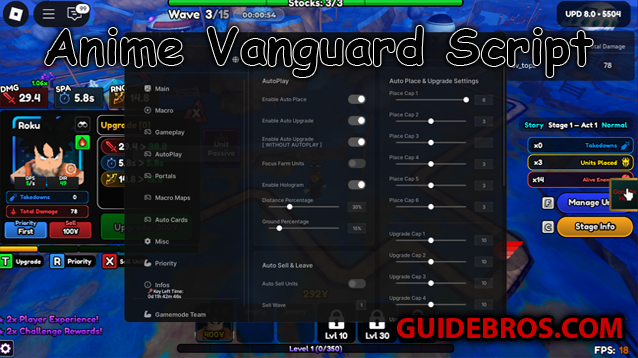
The Goomba Hub script for Anime Vanguards is a popular automation tool made by Goomba. It helps players speed up farming and grind rewards without spending long hours on manual play.
⚡ Main Features
- Auto farming — automatically joins maps, starts battles, skips waves, and replays stages.
- Portal farming — enters portals on its own and can target portal tiers.
- Custom settings — ignore specific worlds, modifiers, or difficulties.
- Macro recorder — record your play pattern and replay it when needed.
- Auto upgrade — keeps your units upgraded while farming.
- Webhook alerts — sends results and notifications to Discord.
- Custom UI — resize components, hide name/avatar, and export your configuration.
✅ Pros
- Saves a lot of grinding time ⏳
- Easy to set up with a user-friendly menu 🎮
- Highly customizable for different farming styles ⚙️
- Supports macros for advanced strategies 🔁
- Stable and trusted by many players in the community ⭐
❌ Cons
- Using scripts carries a ban risk ⚠️ (Roblox disallows executors)
- May stop working after game updates — requires maintenance 🛠️
- Needs a Roblox executor (extra setup) 💻
- Can reduce the fun or challenge of playing normally 🎭
🎯 Why You Might Use It
Use Goomba Hub if you want to save time and collect rewards without constant manual play. It’s a good choice when you value speed, fine-grained automation options, and the ability to run complex macros.
🚫 Why You Might Avoid It
Avoid the script if you care about keeping your main Roblox account safe (there is a ban risk), if you prefer the legit challenge of playing by hand, or if you don’t want to install and maintain executors and script updates.
👉 Short Summary
Goomba Hub is powerful and efficient — perfect for players who want fast, automated farming. But it’s not without risk: using it may put your account at risk and can change the feel of the game. Use wisely. ⚖️
🛠️ Tutorial: How to Use the Script
⚠️ Disclaimer: Using Roblox scripts goes against Roblox’s Terms of Service. If detected, your account may be banned. Always proceed at your own risk. 🚫
📥 Step 1: Download a Roblox Executor
- Free options: Krnl, Fluxus, Evon
- Paid (more stable & safer): Synapse X, Script-Ware, Codex
📜 Step 2: Get the Script
- Check Tora Is Me’s YouTube videos (look in the description or pinned comment). 🎥
- Use trusted script-sharing sites only (avoid shady links). 🔒
🎮 Step 3: Open Roblox & Join Steal a Brainrot
Launch Roblox and enter the game like normal. 🕹️
💻 Step 4: Inject the Executor
- Open your executor program.
- Click Inject to attach it to Roblox. 🔗
📋 Step 5: Paste the Script
- Copy the script code (usually from Tora Is Me).
- Paste it into the executor’s script box. 📝
▶️ Step 6: Execute the Script
Hit the Execute button. The custom GUI should now appear in-game. ✨
⚙️ Step 7: Toggle Features
Use the GUI to switch on features like Auto Farm, Teleport, ESP, Godmode, Walk Speed, and more. 🚀
🏆 Step 8: Enjoy the Features
That’s it! You now have a big advantage in Game. Have fun — but remember the risks. ⚖️
Helpful Guide?
Sharing helps us create more pro-level content for you!