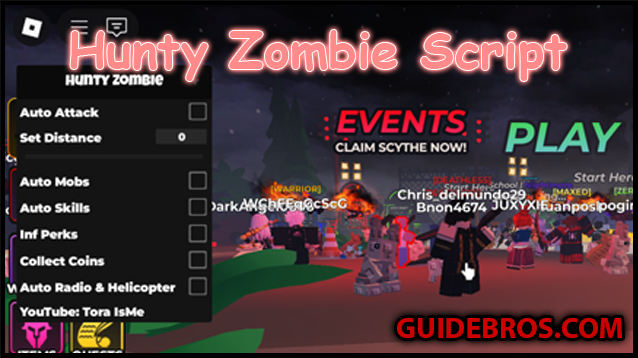
⚙️ What the script does
After loading the script with a Roblox executor, it gives you an in-game menu (GUI) with several automation and enhancement features. Typical abilities include:
- ✅ Auto Farm — Automatically defeats zombies and picks up rewards.
- ✅ Kill Aura / Auto Attack — Instantly damages nearby enemies.
- ✅ Auto Skills — Uses your character's abilities automatically.
- ✅ God Mode — Prevents or heavily reduces incoming damage.
- ✅ Teleport / Speed Hacks — Move around the map much faster.
- ✅ Auto Quest / Auto Join — Handles missions and match joining for you.
⭐ Pros
- Huge time saver — No need to grind manually; farming becomes effortless.
- Faster progression — Unlock upgrades, weapons, and skills more quickly.
- Easy boss fights — Kill Aura and God Mode make tough zombies much easier to handle.
- No key needed — This release does not use annoying key systems some scripts require.
- Trusted scripter — Tora IsMe is known in the Roblox scripting community, so releases tend to be more reliable than unknown sources.
⚠️ Cons
- Risk of ban — Exploiting breaks Roblox rules; detected accounts can be banned.
- Executor required — You need a separate program (e.g., Synapse X, Fluxus, Script-Ware), which may cost money or carry its own risks.
- Breaks on updates — Game updates can disable script features until someone updates the script.
- Possible bugs / crashes — Some features may cause errors or disconnects.
- Not fair play — Using cheats removes the challenge and can affect other players' experience.
✅ Why you might use it
- You’re tired of grinding and want faster progress.
- You play casually and want to enjoy mowing down zombies without the grind.
- You’re willing to use a secondary/alt account to protect your main.
- You like experimenting with scripts and Roblox modding.
❌ Why you might skip it
- You value your main account and don’t want to risk a ban.
- You enjoy the challenge of progressing naturally.
- You don’t want to use third-party executors or installers.
- You play with friends who prefer a fair, cheat-free experience.
🛠️ How to load the script (summary)
Important: Scripts require third-party executors and carry risks. Only use trusted sources and understand the consequences.
- Get an executor (examples: Synapse X, Script-Ware, Fluxus).
- Install and follow the executor's instructions.
- Open Roblox and launch Hunty Zombies.
- Attach the executor to Roblox and paste the script code into the executor window.
- Execute the script — a GUI should appear with toggles for features.
Example loader line (as commonly shared):
🎯 Final thoughts
The Hunty Zombie script by Tora IsMe can make the game a lot more relaxed and fun if you want to skip tedious grinding. But remember the trade-offs: possible bans, crashes, and the ethics of using exploits in multiplayer games. If you try it, consider using an alt account, choose a reputable executor, and be prepared for scripts to break after game updates.
Helpful Guide?
Sharing helps us create more pro-level content for you!